Did you know “$” sign is an important part of excel formula? I would try to teach how you could use this sign.
Problem : How can I fix the pick up point in one Excel Cell reference only? ( For this example it is Cell reference A1 )
Answer : You can do it by placing the cursor inside the formula at the desired cell reference and press F4, In the figure below at Cell reference C1Â with an original formula of ( =+B1*A1 )it has been change to ( =+B1*$A1$ ) in order to fix the pick at Cell A1.
How to do this?
Go to cell C1 and point your cursor to A1 ( =B1*A1 ) Then pres F4. Then you can just copy and paste anywhere in the sheet and it will still link to A1. You can do a horizontal and Vertical Copy.
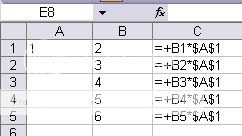
When “$” sign is at the right side it will just collect fix at A1 if you will copy and paste in vertical ( up or down )
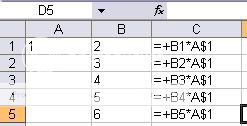
When “$” sign is at the right side it will just collect fix at A1 if you will copy and paste in horizontal ( left or right )
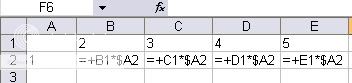
You can manually change the dollar sign position. However you could also press F4 to change dollar location.


preciso a formula do cnpj para excel.
muito obrigado se vc conseguir.
[…] time to time I am sharing some Tips about Microsoft Excel since I am a heavy user of this program. So here my sharing for today. You can see my other article […]
@ r0m4n,
Good to know that it helps you
Dexter’s last blog post..Link Love # 10 :Filipino SEOContest2008 Contenders and Other Good Stuff
thank you very much for this… it saved me today at work 😉 i completely forgot how to anchor a formula to a single spot so it doesnt mess everything up when you paste in other places! thanks again!!!!
r0m4n
[…] Excel Trick : What is the use of $ sign ? […]
[…] time to time I am sharing some Tips about Microsoft Excel since I am a heavy user of this program. So here my sharing for today. You can see my other article […]