I am doing a report using Microsoft word and one of the task that I have to do is to insert a PDF file in the Main Microsoft Word Document. I tried lots of technique to do this and finally I get it. This might not be the only solution but this is the solution that I have tried and I want to share it to you.
Just follow the following steps.
Step 1 : Press ( Insert >>> Object )
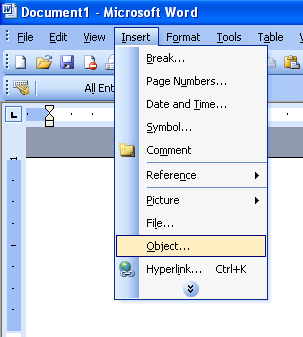
By pressing the Insert >> Object as shown above, The computer will lead you to a windows asking to ” Create new ” or ” Create from File “. Since my aim is to insert PDF File in Microsoft Word I have to choose ” Create from File “
Step 2 : Browse the PDF Files that you need to insert into Microsoft Word
It could be a PDF file, Microsoft Word Files or any other type of computer documents
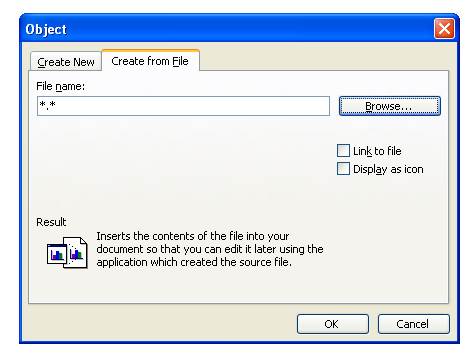
Step 3 : Press Browse
You have to locate the location of the document with in your computer. If you want to update your document whenever you change the sub documents. You have to press the ” Link to File “ box. And if you like to display the File Icon just press the ” Display Icon Box “
Step 4 : Test your link
Upon completing Step 3 and locating your file. An icon in your Microsoft Word Document should show the below icon. Save your file and go to other computer and then try to open the document . Upon Double Clicking the Document the icon it should open.

There it is, A simple but yet hard for me to figure out. Since Google Search result did not gave me this tip.
I just hope this could help to others looking for the same solution.


Thanks man, was brain storming how to do this. as you said A simple but yet hard for me to figure out
That’s great if you want to go to or print the PDF as a separate doc, but I need to insert it int the document and have it print with the correct page number and Heading of my word document. I can insert it, but the quality is terrible.
I also need to insert form made in Word keeping the form’s headers and footers, but also the bid document’s headers and footer.
Any way you can help me?
thanks.it helped although still do not know how to insert the whole .pdf file which contains several pages.
You solution mentioned is only to insert a single page of that .pdf file
Thanks
Thanks!
The right solution I was looking for.
@marblenet,
No problem.. Glad to be of help to you
How do you do this using Word on a MAC?
@Rebecca Seymour,
Sorry but I have not tried it on MAC
It did not work with multiple page .PDF files.
It only shows the first page.
How about Word 2007? There is no object option. What can I do?
Thank you so much for sharing this! Such a simple solution.
@luckyboy,
Welcome 🙂 Great to be of help
We are unable to make and have changes retained in the embedded pdf file. We use Acrobat Pro 9. Any ideas? Thanks
This is brilliant! Thanks for taking the time to post this up Dexter. If only all the answers to my computer needs were this clearly explained with good pictures. Good work
@Neil,
You are most welcome neil
good tip. Big help. Thanks
@theo,
Your welcome 🙂
You are friggin genius big ups
@godz,
Thanks 🙂
[…] How to insert pdf files in your microsoft word document […]
It is my pleasure to give help to those in need 🙂
Dexters last blog post..Unboxing HP Photosmart C5283
Wanted to thank you as well for this tip. MSWord always wants to consider itself as brighter than you are; persuading it to do what you want rather than what it wants can be nearly impossible. Thank heaven for the internet. “Help” is nearly useless at times like these!
Q Qwerty..
Glad it help you
Thanks! You saved my behind