Objective : To be able to join Text data in Excel cell.
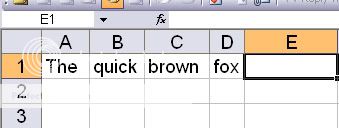
Have you encountered a task in excel where you need to connect the data content of A1,B1,C1 & D1 as shown in the picture. Well it is easy if it is only 1 or two but what if you have a thousand of same task to do?. You just have to use the below formula :
=A1&” “&B1&” “&C1&” “&D1&”” ( Resulting data = The quick brown fox )
The space in between two quotation marks signifies the space of its resulting data. If you put anything in between the two quotation marks it will show up. See below example :
=A1&”-“&B1&”-“&C1&”-“&D1&”” ( Resulting data = The-quick-brown-fox )
and if you are going to do this in repetitive task , Make the formula in Cell E1 and then copy. Hope this helps.


[…] How to join Excel data in Cell […]
Thanks for stopping by Byron. You have also a nice site.
Hi, Rexted,
Thanks for the Excel tips! It is amazing how many folks are looking for stuff you probably take for granted. I wanted to share with you an Excel Add-in that a friend of mine introduced me to a few months ago. It’s called ASAP Utilities. (Here is my writeup of it on my own blog: Excel Add-in. This thing has literally hundreds of helpful shortcuts. I was late to the game in starting use it at my company as all of the Excel gurus had been using it a while. You may be already too. But if not, you may want to check it out. I’m not affiliated with them in any way…just blown away by all the cools stuff it does!
Best regards!
Byron